Washers
Washer Not Filling With Water? What to Check First
Washer won't fill, or fills slowly? The checks to try first, from closed valves to clogged inlet screens, the parts that usually fail, and what repair costs.
By Jax Appliance Pros · · 7 min read
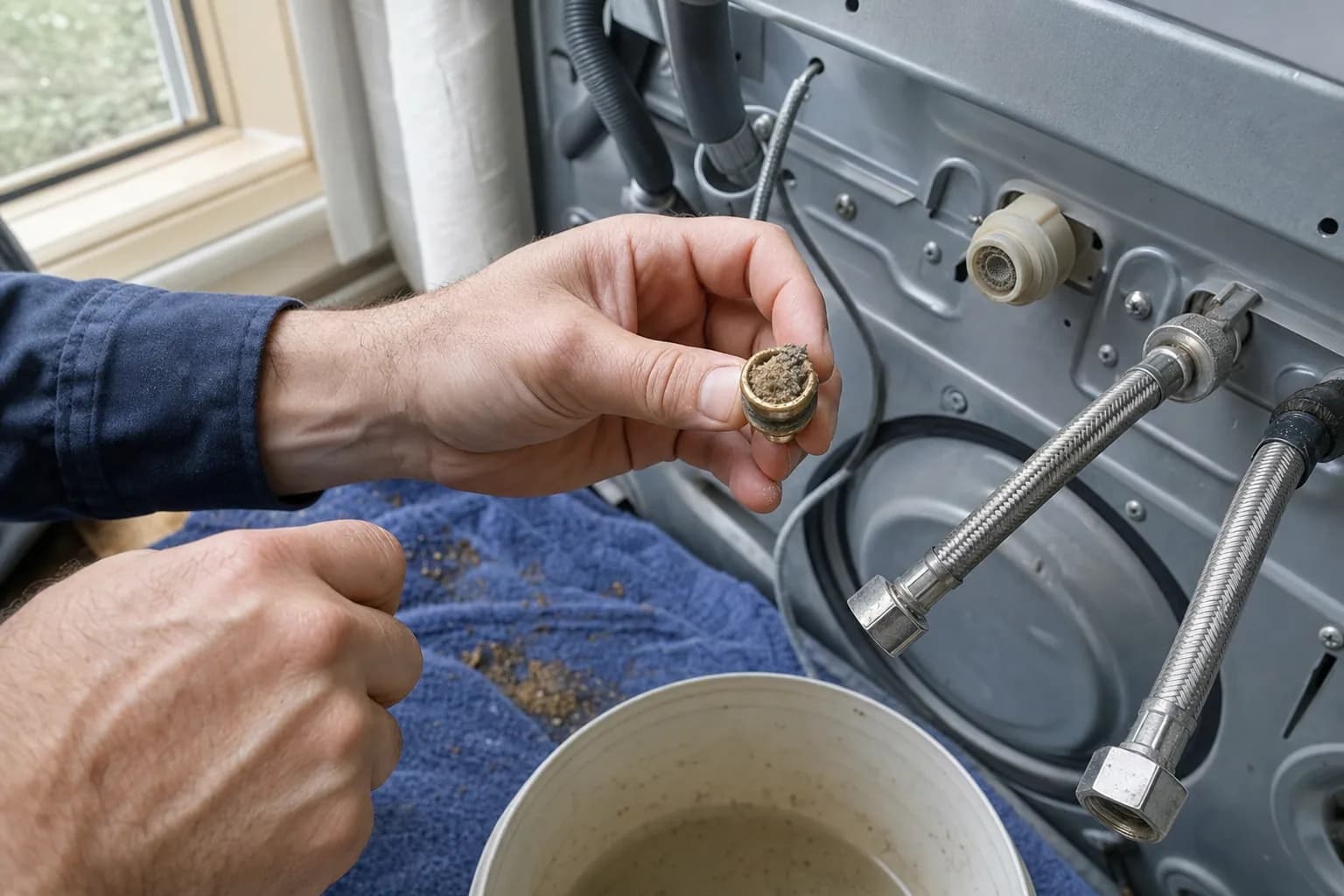
A washer not filling with water, sitting silent when it should be filling or trickling water in so slowly that the cycle stalls, is usually not getting enough water to its inlet valve, or the valve is not opening. Start with the supply side. Closed valves, kinked hoses and clogged inlet screens cause a large share of these problems, and you can check all three yourself.
Water and electricity do not mix. Turn off both water valves and unplug the washer before you disconnect a hose or reach behind the machine, and keep towels and a bucket handy, because the hoses hold water.
First, is it really not filling?
If you have a high-efficiency (HE) washer, especially a top-loader without an agitator, a low water level is normal. These machines sense the load and add only enough water to wet it, so you will not see the tub fill the way an older washer did. Whirlpool notes that it is normal for some of the load to sit above the water line, and it warns against adding extra water, because clothes that float do not get cleaned as well. If yours washes and rinses normally and the clothes come out clean, it is working as designed.
The real problems are no water at all, a fill that stops short, and a fill so slow that the washer stalls or shows an error.
Checks you can do yourself
- Open both valves all the way. The hot and cold valves behind the washer are easy to bump or leave half-closed after plumbing work or a vacation. Whirlpool says both valves must be fully open, and both the hot and cold hoses connected, for its washers to work correctly.
- Check the house water. Turn on the laundry sink or a nearby faucet. If the pressure is weak there too, the problem is in the plumbing or the well, not the washer.
- Straighten the hoses. Pushing the washer back against the wall, or its own vibration, can kink an inlet hose. Pull the washer out a few inches and make sure both hoses curve smoothly.
- Remove anti-flood devices. Whirlpool notes that anti-flood devices fitted between the faucet and the hose can reduce the water reaching the washer. If you have one, try the washer without it.
- Clean the inlet screens. With the water off and the washer unplugged, unscrew the hoses from the back of the washer (pliers help) and look into the ports. Small mesh screens there catch rust, minerals and sand; in parts of Clay and Nassau counties, sand and sediment from well water clog them quickly. Whirlpool says to scrub its screens in place with an old toothbrush and mild soapy water. LG and Samsung screens pull out with pliers for rinsing under the tap. Reconnect the hoses and watch for drips when the water goes back on.
- Close the lid or door firmly. Whirlpool says some newer top-loaders will not fill or wash with the lid open, and that clothing, lint and detergent buildup can keep the lid from locking. On a front-loader, make sure nothing is caught in the door seal.
- Reset the washer. Unplug it for five minutes, plug it back in and start a new cycle.
Washing machine won't fill at all
Listen when you start a cycle, because the sound tells you where to look.
- A hum or buzz, but no water: the inlet valve is getting power, but water is not coming through. Recheck the valves, hoses and screens. If they are all clear, the valve itself has probably failed.
- Silence, but the display shows the cycle running: the washer may be waiting for a lid-locked or door-locked signal it never gets, or the control may not be sending power to the valve.
- No lights at all: that is a power problem, not a fill problem. Check the outlet, the breaker and any GFCI outlet.
Washer not filling up with water all the way
If the washer adds some water and then stops short, or seems to fill forever without reaching the level it needs:
- On an HE washer, first make sure the level is actually wrong (see above).
- The pressure switch, or water level sensor, may be misreading the level. It works through a small air tube, and a kinked or clogged tube gives false readings. On LG washers, a PE code means the water level sensor has malfunctioned, according to LG's error code list.
- Water may be draining as fast as it comes in. A drain hose pushed too far down the standpipe or taped into it, or a standpipe that is too short, lets water run out during the fill; Whirlpool lists all three as causes of its long-fill error.
Washer fills slowly
A slow fill usually means a restriction somewhere between the house and the valve:
- Partly clogged inlet screens, the most common cause, especially on well water.
- Low household water pressure. Washers need a minimum pressure to fill on time; LG, for example, specifies 14.5 to 116 psi. On a well, a clogged whole-house sediment filter can drop the pressure at every faucet.
- A hose kinked partway, or an anti-flood device.
- A worn inlet valve that no longer opens fully. If only the hot or only the cold side is slow, and that side's screen is clean, the valve is the likely culprit.
Error codes that mean "no water"
Most washers flag a fill problem on the display once the fill takes too long:
- Whirlpool shows F8 E1 (or LF or Lo FL on some models), which means the washer is not detecting the correct amount of incoming water, according to Whirlpool support.
- LG shows IE, a water inlet error: the tub did not fill to the right level in the time allowed, according to LG support.
- Samsung shows 4C, 4E or nF, which means water is not entering the washer correctly, according to Samsung support.
If the code comes back after you have checked the valves, hoses and screens, the inlet valve is the usual cause. Owners of LG and Samsung washers can find the full code lists in our guides to LG washer error codes and Samsung washer error codes.
What usually fails
- Water inlet valve. The part that most often fails when a washer will not fill. The signs are a hum with no water, one temperature missing, or a slow fill even with clean screens.
- Lid switch or door lock. The washer never confirms the lid is closed or the door is locked, so it never starts the fill. A flashing lid-lock light or a door error code points here. Please do not tape or bypass the switch; it is what keeps hands out of a spinning drum.
- Pressure switch or water level sensor. Wrong readings stop the fill too early or keep it from starting. Sometimes the fault is just the air tube.
- Control board. If the valve, switches and sensor all test good, the board may not be sending power to the valve. We confirm this with tests before replacing a board.
What washer repair costs in Jacksonville
The diagnostic is 79 and is waived when you approve the repair. Washer repairs start at 179 labor plus parts, and you get a written flat-rate estimate before any work begins. Inlet valves, lid switches and door locks sit at the lower end, and we carry common parts on the van, so most repairs are finished on the first visit. If a part has to be ordered, there is no trip charge for the return visit. Every repair carries our 90-day parts-and-labor warranty. See our pricing.
Keep it from happening again
- Replace rubber fill hoses every five years, as Whirlpool recommends.
- On well water, check the inlet screens a couple of times a year.
- Leave a few inches between the washer and the wall so the hoses never kink.
If your washer fills fine but will not drain or spin, see washer not draining or spinning.
Schedule washer repair or call (904) 561-4790 for same-day service across Jacksonville & the First Coast.
About Jax Appliance Pros
Locally owned appliance repair for Jacksonville, the Beaches, St. Johns, Clay and Nassau counties. Same-day or next-day service on refrigerators, washers, dryers, dishwashers, ovens, cooktops, ranges and garbage disposals. $79 diagnostic waived with the repair, 90-day parts-and-labor warranty, licensed and insured. More about us.